Paying Your Business Energy Bill Has Never Been Easier
When you choose Constellation as your energy supplier, in most markets, you will still be billed by your utility. In other markets, you will be billed directly by Constellation. In that case you may qualify for a number of payment options. Please see below for details.
- Auto Pay
- Online Payments
- Pay by Phone
- Pay by Mail
The easiest way to pay your Constellation bill is to set up recurring payments. You can use your Discover Card, Visa or MasterCard, and your payment will be debited on your statement date. You can also set up a pre-authorized Automatic Bank Draft, and your payment will be securely withdrawn from your bank account on your invoice date.
Two Ways to Enroll in AutoPay:
1. Sign into your account here and click "Enroll in Autopay" from the Dashboard
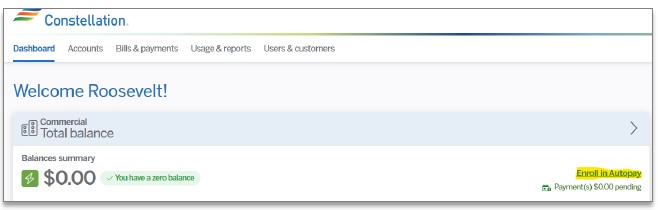
2. In your account, click on Bills & Payments > Payment Methods to view the account list and to view preferred Payment Method.
Under “Manage Your Billing” click the box to the left of the Account record or click the box next to “Name/Alias” to select All.
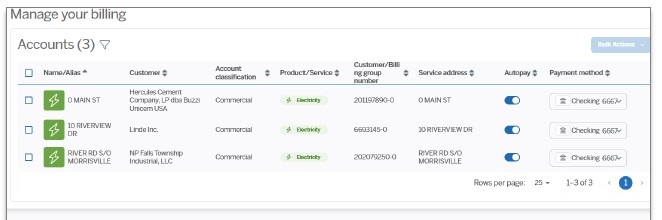
Select Payment Method if enrolling and agree to terms and conditions.
You can pay your Constellation bill online with your Discover Card, Visa, MasterCard, or ATM/Debit card. You can also pay by electronic check.
Make a guest payment/one time payment here

Constellation’s automated phone payment system is available 24 hours a day, 7 days a week. To make a payment by phone, call:
- Power & Gas Customers -
- Texas Customers -
- Georgia Customers -
Of course, you can still pay your Constellation bill by mail. Please use the remittance address on your bill. In general to pay by mail, send a check to:
- Natural Gas Customers - Constellation-Gas, P.O. Box 105223, Atlanta, GA 30348-5223
- Power Customers - Constellation NewEnergy, INC., 14217 Collections Center Dr, Chicago, IL 60693-0142